The ODM Study Designer

XML4Pharma
Home Services CDISC News About us

The CDISC ODM Study Designer v. 2009 R1

The ODM Study Designer is certified by the CDISC Organization to be fully compliant with the CDISC ODM 1.2, 1.2.1 and 1.3 standards.

Download the "New features" document

Overview
How it works
SDTM-annotated CRFs
Views of the Study Design
Prototype annotated eCRFs
Fully internationalized
CDASH forms
CDISC Controlled Terminology
Support of Vendor Extensions
Advantages over other Study Design tools
Licensing
Frequently Asked Questions

Some of the new features:

Overview

Setting up clinical studies in CDISC ODM format has many advantages. It allows to exchange the study setup information in a standardised, vendor-neutral format. Moreover, as CDISC ODM is based on XML, it allows automation of otherwise cumbersome and time consuming tasks like database creation, setting up the CDMS, design and generation of eCRFs, etc..

Until now, a good, affordable software tool for setting up clinical studies in ODM format was not available. Some companies are using an XML Editor like XMLSpy to generate the Study setup in ODM format, others did not use the ODM at all and kept sending Study and protocol information as Word documents or PDFs to the CRO, EDC company or other partner in the clinical process.

Therefore we designed the ODM Study Designer, which allows to set up a clinical study in ODM format without any knowledge of XML at all. The tool is very user-friendly, as it works with many dialogs and wizards, so that also users who are new to CDISC ODM can learn very quickly how to generate all necessary Study information in ODM format.

How it works

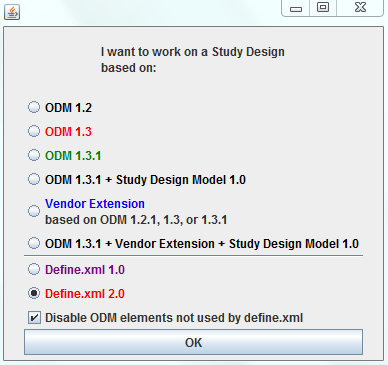
Unlike most of the vendors that offer clinical study design tools, we decided to use the CDISC ODM Standard (and its XML-Schema in particular) as the basis of the tool. This means that when starting up the ODM Study Designer, it reads an ODM XML-Schema and automatically generates all elements of the graphical interface: tables, dialogs, wizards, etc.. This means that when a new version of the ODM becomes available, no software upgrade is necessary. Moreover, as the ODM Study Designer reads and writes ODM (no other or propriety format is used), partners within the clinical process can exchange study setups without the need of having the same software. So if part of the design has been done by a partner using other software, and if that software can export in the open and vendor-neutral CDISC ODM format, than that design can be read by the ODM Study Designer. As the ODM Study Designer saves a Study design as ODM format, it can be used by other tools for further design, setting up the CDMS automatically, creating eCRFs on the fly, etc..


The menus, dialogs and wizards are created from the information in the ODM XML-schema

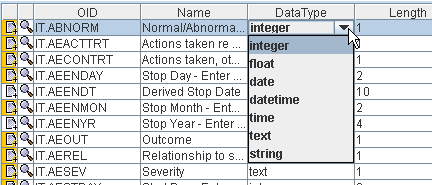
Once the ODM Study Designer has loaded the ODM XML-Schema, it automatically generates the graphical interface elements (menus, wizards, dialogs) from the information in the XML-Schema. This includes all the rules defined in the XML-Schema. For example, if the ODM Standard defines that the element GlobalVariables can only have one subelement StudyName, than it will never be possible to add more than one StudyName element to the ODM document. Another example is e.g. when the ODM Standard defines that the OrderNumber attribute must get an integer value, then it will never be possible to add anything else than an integer value in the corresponding table cell. So the ODM Study Designer has been made idiot-proof to the maximum of the possibilities.

When using the ODM Study Designer, the user never sees any XML. The ODM Study Designer has been designed so that all information is entered in graphical mode, either by selecting from a list of possibilities, other by entering text in a text box.

User-friendly and idiot-proof widgets make it almost impossible to enter invalid values for parameters

The ODM Study Designer uses many dialogs and wizards. This to enable the user to rapidly add all the necessary information to the study design without the risk of making formatting errors or to enter invalid values for parameters.
So, for example, if the user assembles a Form, populating it with ItemGroup's (groups of items), the user gets a dialog letting him/her choose between all ItemGroup's that have been defined so far. As such, he/she cannot enter an ItemGroup ID of an ItemGroup that is not present in the study.

Many dialogs and wizards are used. Here for selecting a language for text translations, and for selecting an ItemGroup in a Form

Furthermore, internal references are always kept up to date. For example, if the user changes the ID of an Item, than automatically, all references to the ID of that Item are updated.

In each of the panels that show up on the screen, validation of the contents of that panel against the CDISC ODM standard can be performed (using the "Validate" button). Validation is performed as well against the XML-Schema, as against the rules that are described in the ODM specification. Furthermore, at any moment, the user can decide to do a full validation of all the information entered so far against the CDISC ODM standard.

Conformity checking against the standard can be performed at all levels and at the overall level

Libraries of CodeLists, Items, ItemGroups, Forms, etc.. can always be saved to file for reuse in the same or other clinical studies. In practice, this is a feature that will be used very often, as it allows for reuse of information.

Libraries can be created, stored and reloaded into the ODM Study Designer

The ODM Study Designer ONLY uses CDISC ODM format. This means that at the end of a working day, the user can save the results of his/her work as ODM, and reload the results the next day to continue the work. It also means that study designs in ODM format from other sources (e.g. partner companies) can be read by the ODM Study Designer: it is not important whether that ODM has been created by the ODM Study Designer or by any other software. This eliminates "vendor lock", due to the usage of the open, standardized CDISC ODM format.

View and test eCRFs as you create them

The ODM Designer can be connected to any EDC system that allows to generate eCRFs from CDISC ODM metadata (as many already do). This allows the designer of the forms to immediately view and test out the forms that were created using the Study Designer.
Alternatively, a service is provided to submit the ODM Design to one of our application servers to generate model eCRFs on the fly, which can also be tested on the fly.
As a second alternative, the user can generate model eCRFs using the build-in system.

SDTM-annotated CRFs

The ODM Study Designer is SDTM-ready. This means that all the domains and SDS variables of the SDTM v.3.1. have been implemented in the software. SDTM annotation can be entered in ODM CRFs in the Domain attribute of ItemGroupDef, and in the SDSVarName, Origin and Comment attributes of ItemDef. Adding SDTM information right from the start of the clinical process, in the study design, has the great advantage that this information is carried together with the data during the whole process, so that it is readily available when creating the submission data (define.xml and Case Report Tabulations).

The ODM Study Designer is SDTM-ready: the list of Domains

All SDTM/SDS Variables have been implemented in a searchable table

Views of the Study Design

At any stage of the development of the Study Design, the user can get an overview of every detail of the design at any level. For example, for each form, the user can get an overview of which ItemGroups with which Items are present in the form. Additionally, all details of each of the ItemGroups (Order, whether Mandatory or not) is listed.
The same is of course possible at the Protocol level. The user gets an overview of which forms are used in which study event (i.e. visit)

Overviews of the design at all levels are available on mouseclick

Prototype annotated eCRFs

New starting from version 1.1 is that the user can generate annotated prototype eCRFs, without needing to connect to an EDC system (*), in any of the envisaged languages.
The annotated prototype eCRFs can be tested, as for each basic type, intelligent widgets are provided. This allows to user to verify that the eCRF contains the correct functionality.
Furthermore, the eCRFs are SDTM-annotated using tooltips.

(*)Of course we can also deliver the functionality to connect to your own EDC system as an add-on.

Fully internationalized

ODM 1.2 had already a good number of internationalization features, but these have been considerably enhanced in ODM version 1.3.
The ODM Study Designer fully allows to design a clinical study, with visits, (e)CRFs, codelists etc.., in any possible written language.
The image belows shows a test eCRF for the Adverse Events Form in the Korean (*) language.

The Adverse Event Form in the Korean language

(*) Very special and sincere thanks to prof. Inyoung Choi, The Catholic University of Korea, College of Medicine, Department of Preventive Medicine, for providing the Korean translations and adding them to the ODM file.

CDASH forms

The CDISC CDASH Standard has recently been published (Nov 2008), and we have immediately implemented it in the software.
This means, that with a few mouseclicks only, CDASH standardized forms for the SDTM domains AE, CM, DM, SC, MH, SU, PE, VS, DS, DA, EX, PD, CO, DV, LB and EG can be loaded into the study design.
Of course, one can then further tailor the loaded CDASH forms to the requirements of the specific study.
Further details and a number of screenshots can be found here.

CDISC Controlled Terminology

All CDISC CDISC Controlled Terminology published during the last years, has already be implemented in the software. Users can load the CDISC Codelists into the software, as the latter is being delivered as a Codelist library.

Support of Vendor Extensions

The ODM Study Designer supports all ODM (Vendor) Extensions based on the ODM 1.2.1 mechanism, including define.xml. Typically, when starting up the software, the user can choose between loading the ODM 1.2 XML-Schema, or to load a (Vendor) Extension XML-Schema which implements ODM 1.2.1. When the extension schema is loaded, graphical user interface elements are automatically created for the vendor extension elements and attributes, as are the rules defined in the extension XML-Schema.
For example, if the vendor extension has defined an extra attribute VisitDate to the StudyEventRef element (listing all possible visits in a Protocol), than an extra column is automatically created which only accepts a valid date. In case an ODM file is loaded with already an invalid date for this field, this can easily be detected by clicking the "Validate" button, or when performing a Validation of the whole ODM document that was loaded.

The newest version (2009-R1) even allows to load a file with vendor extensions "Ref-Def" rules, applicable as well on the extension elements as on the original ODM elements themselves.

Vendor extensions are fully supported. Here a view of entering data for a vendor extension which contains information about Visit scheduling (visit date and visit time)

Ready for the future

The ODM Designer is already ready for the future, as other CDISC standards (such as the Protocol Standard) will also be published as ODM Extension XML-Schemas. This means that when the Schema for a new or existing CDISC standard is published, it is immediately usable in the software. The reason is that the software automatically creates all necessary tables, dialogs and wizards automatically from the XML-Schema itself.
For example, once CDISC publishes the XML-Schema for the Protocol Standard, one will immediately be able to add trial arms and scheduling information using the ODMDesigner, and store and save it in CDISC format.

Licensing

The ODM Study Designer version 2009 R1 has now been released.

The standard license is a perpetual license with free updates until one year after purchase. Several other licensing models can however be made available. CDISC member companies always get a considerable discount. For information about different licensing models and prices, please contact us.

Advantages over other Study Design tools

There are some other Study Design tools on the market, including some that allow export in CDISC ODM format. The great advantage of our Study Designer is that it uses the CDISC ODM XML-Schema as the basis of the design tool. This means that when you want to start with a new version of the CDISC ODM (e.g. ODM 1.3 has a lot of new, exciting features, especially for use in EDC), you do not need an expensive upgrade of the software. You just load the ODM 1.3 XML-Schema and can immediately start working with all the great new features that come with ODM 1.3.

Furthermore, the ODM Study Designer fully supports ANY vendor extension, as long as it is based on the CDISC ODM Vendor extension mechanism. This means that you are not tied to an EDC vendor (or his tools) who uses his own extensions. If you change EDC vendor, you just start working with the new ODM Vendor Extension XML-Schema, without any additional costs.

Of course, the ODM Study Designer is independent from any specific database or CDMS systems, as the ODM Study Designer does not use a database or CDMS at all. At the contrary, the generated CDISC ODM study design will allow you to set up a CDISC-compliant CDMS at no time, and to generate eCRFs at the click of a mouse button.

Frequently Asked Questions

  • Do I need to know XML to work with the ODM Study Designer ?

    No knowlege of XML at all is required for working with the ODM Study Designer. The user is completely shielded from the underlying XML structure.

  • Do I need to know a lot about the ODM Structure ?

    Only a little amount of knowledge about the ODM is required to be able to work with the ODM Study Designer. Reading the ODM specification once (but skipping the XML issues) is usually sufficient to be able to start to use the ODM Study Designer to develop clinical studies in CDISC ODM format. The reason is that the ODM Study Designer uses many dialogs and wizards, and that for many input fields, idiot-proof widgets and dialogs have been developed.

  • How do I create a Vendor Extension ?

    In some cases, your classic study design may contain more information than is currently covered by the ODM Standard (e.g. visit scheduling). Such information can easily be added to the ODM by using a Vendor Extension. Creating a vendor extension is not difficult (see the CDISC website), but requires some knowledge about XML-Schema.
    If you have any difficulty with this, XML4Pharma will be happy to help you with developing an ODM Vendor Extension for your study designs.

    Contact XML4Pharma
    XML4Pharma, Schlossbergstr. 20, 78224 Singen, Germany. Phone: +49 7731 975044